iOS 27 Release Date: When Is It Coming to Your iPhone — and What’s New?
By Thasmiya
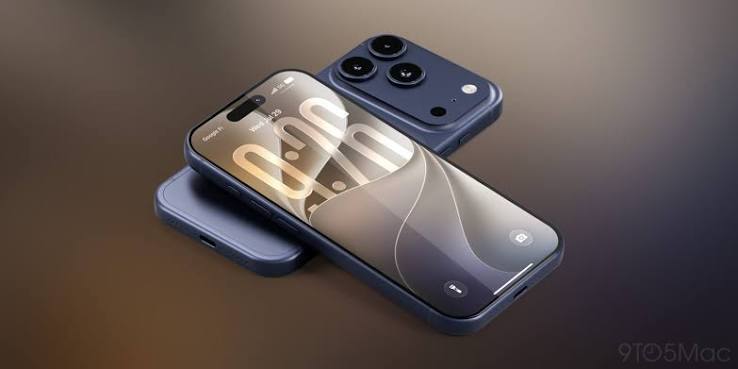
Apple has now confirmed when **[iOS 27](https://www.whatmatters.ae/post/iphone-18-lineup-revealed-ios-27-beta-drops-major-hints-hidden-in-apples-softwar)** will arrive on compatible iPhones.
The next major iPhone software update will be available from **September 14, 2026**, bringing a long list of changes covering performance, Apple Intelligence, Siri, Photos, Safari, parental controls and system design.
However, one of the biggest features — the new **Siri AI** — will not launch at exactly the same time as iOS 27.
Apple says Siri AI will arrive **later in 2026**, initially in English on supported devices.
Here is everything iPhone users need to know before updating. Alongside its iPhone software updates, Apple may also be preparing a major MacBook redesign. Here's what is currently known about the [expected touchscreen MacBook Pro and its possible UAE pricing](https://www.whatmatters.ae/post/touchscreen-macbook-pro-2026-could-apples-new-laptop).
## **When Is iOS 27 Being Released?**
Apple has confirmed that **iOS 27 will be available starting September 14, 2026**.
The update will roll out alongside iPadOS 27, macOS 27, watchOS 27 and visionOS 27.
As usual, iPhone users should be able to install the update through:
**Settings → General → Software Update**
Availability can take some time to appear on every device once Apple begins the global rollout.
## **Is iOS 27 Free?**
Yes.
iOS 27 is a **free software update** for compatible iPhones.
You do not need to buy an iPhone 18 Pro or another new device just to get the operating system.
Many older iPhones going back several generations remain supported.
## **Which iPhones Support iOS 27?**
Apple’s current compatibility list includes:
- iPhone Duo - iPhone 18 Pro - iPhone 18 Pro Max - iPhone 17 Pro and 17 Pro Max - iPhone 17 - iPhone 17e - iPhone Air - iPhone 16 series - iPhone 15 series - iPhone 14 series - iPhone 13 series, including iPhone 13 mini - iPhone 12 series, including iPhone 12 mini - iPhone 11, 11 Pro and 11 Pro Max - iPhone SE, 2nd generation and later
That means the **iPhone 11 remains eligible for iOS 27**, despite now being several generations old.
## **Not Every iPhone Gets Every iOS 27 Feature**
This is an important distinction.
Although iOS 27 itself supports devices as old as the iPhone 11, the latest **Apple Intelligence and Siri AI features require newer hardware**.
Apple says its latest Apple Intelligence capabilities are available on:
**iPhone 16 models or later**
and
**iPhone 15 Pro and iPhone 15 Pro Max**.
So an iPhone 12, 13, 14 or standard iPhone 15 may receive iOS 27 while missing some of its headline AI features.
## **The Biggest Change: Siri AI**
Apple’s biggest iOS 27 announcement is its completely redesigned version of Siri.
Called **Siri AI**, the new assistant is powered by Apple Intelligence and is designed to handle much more natural conversations.
Users will be able to type or speak naturally, ask follow-up questions and hold longer conversations rather than issuing isolated commands.
Apple says Siri AI will also be able to use personal context to help retrieve information already stored across an iPhone.
For example, users could ask Siri to locate an old photo, find information buried inside an email or retrieve a note without manually searching through individual apps.
## **Siri Can Take Actions Across Apps**
Siri AI is also designed to do more inside apps.
Apple says it can take actions across apps such as Messages, Music and Reminders based on what the user is currently doing.
Examples include editing a recently sent message, creating reminders, adding music to a playlist and performing other app actions through natural-language instructions.
This represents one of Apple’s biggest attempts yet to turn Siri from a simple voice assistant into an assistant capable of carrying out multi-step tasks.
## **There Is Now a Dedicated Siri App**
iOS 27 also introduces a dedicated **Siri app**.
Rather than conversations disappearing after individual interactions, users will be able to access previous Siri AI conversations in one place.
Apple says conversations can be pinned and continued across supported Apple devices.
## **Siri AI Is Not Launching on September 14**
Despite being the headline iOS 27 feature, Siri AI is **not expected to be available immediately when iOS 27 launches**.
Apple’s UAE website states that Siri AI is coming in English **later this year**.
Apple says the feature will initially be available as a beta for supported devices configured in English, with additional language availability expanding afterwards.
So users updating on September 14 should not expect every Siri AI feature to appear immediately.
## **AI Photo Editing Gets a Major Upgrade**
The Photos experience is also getting more powerful.
iOS 27 introduces **Spatial Reframing**, allowing users to reframe photos after they have already been captured.
An Extend tool can expand images beyond their original frame, while Apple’s upgraded **Clean Up** feature can remove larger unwanted objects from photographs.
Apple Intelligence is also being integrated further into Image Playground, including support for generating images in a broader range of styles.
Some of these AI features are limited to supported devices and languages.
## **Siri Mode Comes to the Camera**
Another significant change is **Siri mode in Camera**.
Users can point their iPhone camera at something in the real world and use Visual Intelligence to ask Siri questions about what they are seeing.
Apple’s demonstrations include identifying objects and retrieving information directly through the camera interface.
This effectively turns the camera into another way of interacting with Siri AI.
## **Safari Can Watch Websites for Changes**
Safari gains a useful feature called **Notify Me**.
Users can ask Safari to monitor selected pages for changes and receive an alert when something happens.
Apple gives examples such as watching for:
- Price changes - Product restocks - Other webpage updates
Safari can also automatically group tabs into topics to make large numbers of open pages easier to organise.
## **Passwords Can Fix Weak Passwords for You**
Apple’s Passwords app is becoming more proactive.
iOS 27 can identify weak or compromised passwords and, for supported services, help update them on the user’s behalf.
The aim is to reduce the need to manually visit individual sites and navigate through password-reset processes.
## **Shortcuts Gets Much Easier**
Apple is also using AI to simplify the Shortcuts app.
Instead of manually assembling a sequence of actions, users can describe what they want the Shortcut to do.
For example, Apple says someone could request a Shortcut that automatically sends a message with their ETA when they leave work.
iOS can then connect the required actions across supported apps.
## **iOS 27 Changes the Liquid Glass Look**
Apple is refining the **Liquid Glass** visual design introduced in previous software.
iOS 27 improves contrast and readability while making app icons sharper and more detailed.
There is also a new appearance slider that lets users adjust Liquid Glass from a clearer look to a more heavily tinted appearance.
This gives users more direct control over how transparent or pronounced Apple’s interface effects appear.
## **Apple Says Apps Launch Up to 30% Faster**
Performance is another major focus.
According to Apple, iOS 27 can deliver:
**Up to 30% faster app launches**
**Up to 70% faster loading of new photos in the Photos library**
**Up to 80% faster AirDrop transfers**
Apple attributes the improvements to deeper changes across the operating system, including updates to CPU scheduling and system resource management.
Real-world gains will naturally vary depending on the device and workload.
## **Wi-Fi and Mobile Data Switching Should Feel Smoother**
iOS 27 also improves how the iPhone moves between Wi-Fi and cellular networks.
Apple says the system is better at automatically selecting the best available connection while users move between locations.
That could make activities such as navigation, calls, downloads and messaging more reliable when leaving home, moving through an airport or switching between Wi-Fi networks.
## **Mail Search Is Getting Better**
Apple is improving search inside Mail.
A new ranking system is designed to place the most relevant messages at the top of search results instead of simply relying on keyword matches and chronology.
The change should make it easier to locate older emails buried in a large inbox.
## **Major New Parental Controls**
Parents are getting several new tools in iOS 27.
During initial iPhone setup, parents can choose which system apps a child is allowed to use.
A new **Ask to Browse** feature lets children request permission before visiting new websites, with parents able to approve or decline the request.
Communication Safety is also being expanded.
Apple says the feature can now intervene before children view certain violent or graphic imagery, alongside its existing protections around nudity.
## **Screen Time Gets Time Allowances and Schedules**
Screen Time is also becoming more flexible.
Parents can create **Time Allowances** for categories such as entertainment and games and can set different access schedules depending on the day or time.
Apple has also redesigned parental-control settings to make a child’s device usage easier to understand and adjust.
## **iCloud Shared Albums Improve for Android Users**
Shared Albums are becoming more useful for families and groups who do not all use Apple devices.
Apple says Android and Windows users will have an easier way to join and contribute photos through iCloud.com.
Shared Albums will also support full-resolution sharing, improved filters, reactions and additional invitation options.
## **Health Adds Perimenopause Support**
Cycle Tracking in the Health app is gaining features related to **perimenopause and menopause**.
Apple says the app can provide notifications when logged cycle patterns may be suggestive of perimenopause and can help users track associated symptoms.
## **Apple Maps Flyover Gets an AI Upgrade**
Flyover in Apple Maps is being enhanced with Visual Intelligence models.
Apple says aerial imagery can now render finer environmental and architectural detail, including building features and individual trees.
Availability will depend on location.
## **AirPods Get Custom EQ**
Compatible AirPods will gain additional audio controls in iOS 27.
Users can manually adjust **low, mid and high frequencies** through AirPods settings, giving them more control over the sound profile.
## **GymKit Comes Directly to iPhone**
GymKit is also coming to iPhone.
Users will be able to connect compatible cardio equipment — including treadmills, bikes, ellipticals and stair machines — to their iPhone for more accurate workout metrics.
Apple also highlights integration with AirPods Pro 3 for heart-rate tracking during supported workouts.
## **iOS 27 Has Special Features for iPhone Duo**
Apple’s first foldable, the **iPhone Duo**, uses a specially adapted version of iOS 27.
When unfolded, iPhone Duo can show two Home Screen pages, with Today View positioned alongside the main Home Screen.
Controls and navigation can move to the side of the display to create more vertical space, while the interface dynamically changes depending on how the phone is folded or positioned.
Apple has also redesigned elements such as the Dynamic Island and status indicators specifically for the foldable display.
## **Should You Install iOS 27 on Day One?**
For most compatible iPhone users, iOS 27 brings meaningful improvements in security, performance and everyday functionality.
However, users with older devices may prefer to wait briefly after release if maximum stability is more important than immediately getting new features.
Early major software releases can sometimes expose compatibility issues with third-party apps or accessories before subsequent updates address them.
It is also worth remembering that installing iOS 27 does **not automatically mean you will receive every Apple Intelligence feature**.
Older compatible iPhones will get the operating system but not necessarily its newest AI tools.
## **How to Prepare Your iPhone for iOS 27**
Before installing the update, it is sensible to:
- Back up your iPhone using iCloud or a computer - Make sure you have sufficient free storage - Update important apps - Keep the device connected to power during installation - Use a reliable Wi-Fi connection
Once the update becomes available, go to:
**Settings → General → Software Update**
and follow the onscreen instructions.
## **iOS 27 Release: The Key Dates**
The most important date is:
**September 14, 2026 — iOS 27 becomes available.**
Apple’s new iPhone 18 Pro and iPhone 18 Pro Max arrive in stores shortly afterwards on **September 18**, while the new iPhone Duo launches later in October.
Siri AI, meanwhile, is scheduled to begin rolling out in English **later in 2026**, rather than arriving with the initial September 14 update.
## **FAQ**
### **When does iOS 27 come out?**
Apple has confirmed that **iOS 27 will be available from September 14, 2026**.
### **Will iOS 27 be available in the UAE?**
Yes. Apple UAE lists iOS 27 as available starting **September 14**.
### **Will iPhone 11 get iOS 27?**
Yes. Apple’s compatibility list includes the **iPhone 11, iPhone 11 Pro and iPhone 11 Pro Max**.
### **Will iPhone 12 and iPhone 13 get iOS 27?**
Yes. All major iPhone 12 and iPhone 13 models are listed as compatible, including the iPhone 12 mini and iPhone 13 mini.
### **Will every iPhone with iOS 27 get Siri AI?**
No. Apple Intelligence and Siri AI require supported newer hardware, including **iPhone 16 models or later and iPhone 15 Pro or iPhone 15 Pro Max**.
### **Is Siri AI available when iOS 27 launches?**
Not initially. Apple says Siri AI will arrive in English **later this year**, while iOS 27 itself launches on September 14.
### **What are the biggest new features in iOS 27?**
Major additions include Siri AI, improved Apple Intelligence, AI photo editing, Safari Notify Me, stronger parental controls, smarter Passwords, easier Shortcuts creation, performance improvements and Liquid Glass customisation.
### **Is iOS 27 free?**
Yes. iOS 27 is a free software update for compatible iPhone models.
### **How do I install iOS 27?**
Once released, open **Settings → General → Software Update** and select the available iOS 27 update.
## **Information Resources**
**Apple UAE** — Official iOS 27 release date, compatible devices and feature information.
**Apple Newsroom** — Official announcements covering Apple Intelligence, Siri AI and WWDC 2026 software features.
**Apple Developer** — Official release-candidate and developer availability information ahead of the public rollout.
[Apple UAE — iOS 27](https://www.apple.com/ae/os/ios/?utm_source=chatgpt.com)
[Apple OS overview](https://www.apple.com/ae/os/?utm_source=chatgpt.com)
## **Image Resources**
**Apple Newsroom** — Official iOS 27, Siri AI and Apple Intelligence promotional imagery.
**Apple UAE** — Official iPhone interface and iOS 27 feature imagery.
**Apple Developer** — Official software and developer assets where editorial usage is permitted.
For the main article image, prioritise an **official Apple iOS 27 interface visual showing Siri AI or the new iOS design on an iPhone**, credited to Apple.
## Related Reads - [UAE Labour Law Explained: Leave, Gratuity and Resignation Rules](/post/uae-labour-law-explained-leave-gratuity-resignation-rules) - [UAE Golden Visa Requirements 2026: Who Is Eligible and How to Apply](/post/uae-golden-visa-requirements-2026-who-eligible-apply) - [Global Village Dubai Is Reopening for Season 31 This October](/post/global-village-dubai-reopening-season-31-october) - [How Sharjah’s House of Wisdom Is Helping Children Turn Curiosity Into a Lifelong Love of Learning](/post/how-sharjahs-house-of-wisdom-is-helping-children-turn-curiosity-into-a-lifelong-) - [More stories like this](/category/news)